Docker
Docker is the Building phase of the dev pipeline. The pipeline builds and runs services in containers so that linting, tests, and deployment all use the same environment. This page covers how we use Docker locally and in CI.
What Docker Does in Our Pipeline
When you open a pull request, the pipeline runs a build step. That step uses Docker to build the app and run services in a consistent way. If the build fails, the pipeline stops and the PR cannot merge. Locally, we use Docker to run the same backend services so your machine matches what the pipeline and production use.
LAN-HTTPS Development
Development is usually done with the LAN-HTTPS setup: the front end is ran outside of Docker so you get live updates while coding. The rest of the stack (database, backend, proxy) runs in Docker.
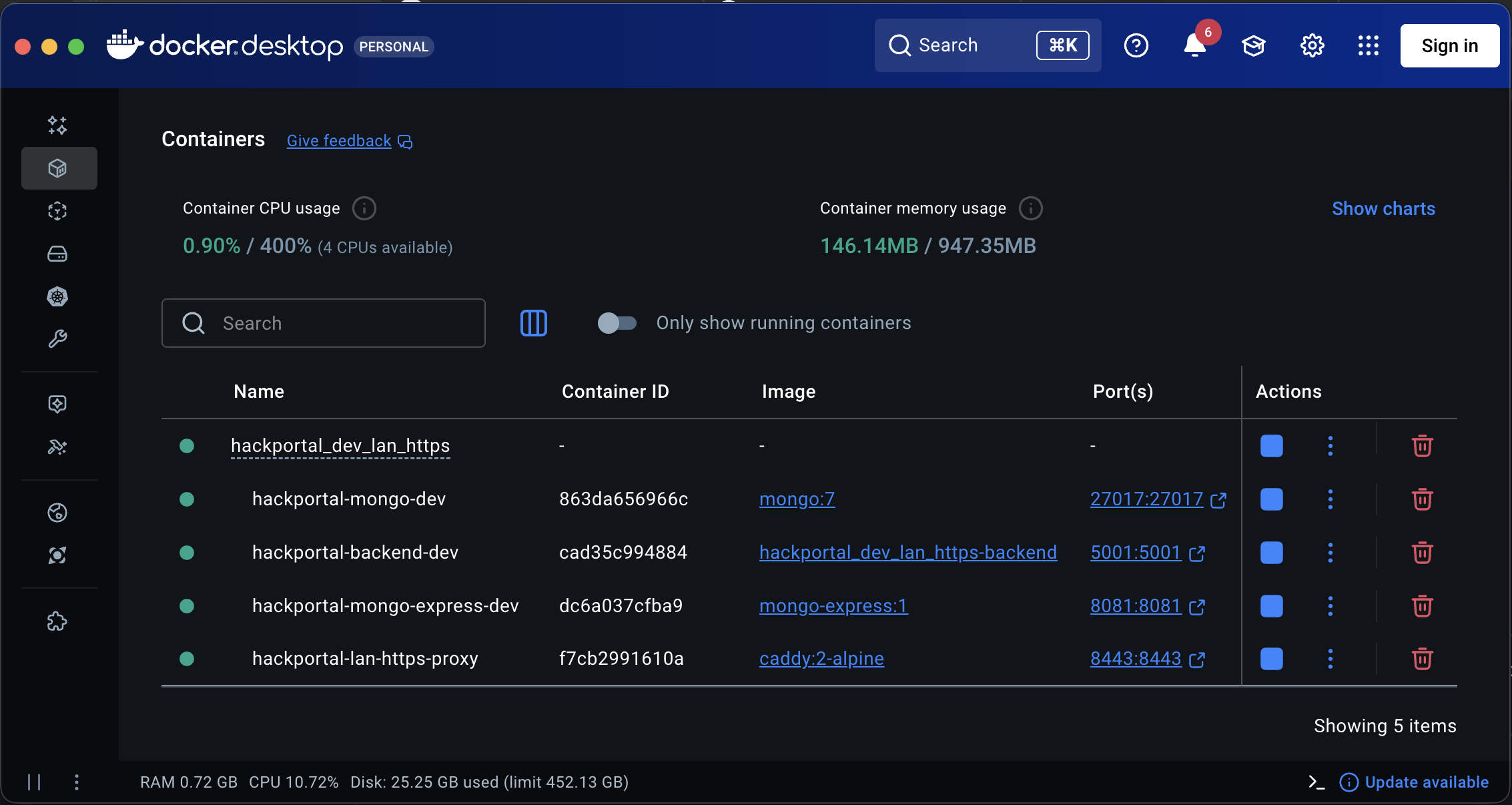
In the screenshot above, the services running in Docker are:
- MongoDB – database
- Mongo Express – database UI
- Backend – API server
- Proxy – reverse proxy / gateway
MongoDB
MongoDB is the primary database. It runs in a container so everyone uses the same version and configuration. The app stores and reads data (users, content, etc.) through the backend, which talks to MongoDB. Keeping it in Docker keeps the database portable and consistent across dev, CI, and production-like setups.
Mongo Express
Mongo Express is a web app that runs inside Docker—you don’t download or install it on your machine. When your Docker stack is running, you open it in your browser at a URL (for example http://localhost:8081, or whatever port your project uses). There you can browse collections, view documents, and edit data. It’s like phpMyAdmin but for MongoDB: a separate UI that talks to the database. Use it during development to inspect or fix data; it’s not used in production.
Backend
The Backend container runs the API server (e.g. Node/Express or your stack’s backend). It connects to MongoDB and other services. Building and running it in Docker ensures the same runtime and dependencies as in the pipeline and makes it easy to start the whole stack with one command (e.g. docker compose up).
Proxy
The Proxy container runs a reverse proxy: one entry point that sends requests to the right service (frontend, backend, etc.). We use Caddy, a web server that handles HTTPS easily.
Why use a proxy?
Without it, the frontend and API live at different URLs, which can cause CORS and cookie issues (e.g. when testing from your phone on Wi‑Fi). The proxy gives you one URL (e.g. https://192.168.0.94:8443): it serves the frontend at / and forwards /api to the backend so the browser sees a single origin.
What are certificates (certs)?
Certificates let the browser use HTTPS (encrypted traffic). For LAN-HTTPS we put cert files in config/certs/ (e.g. cert.pem, key.pem), often created with mkcert so your machine and browser trust them locally. Caddy uses those certs and listens on HTTPS (e.g. port 8443), so you can open https://<your-lan-ip>:8443 from a laptop or phone without mixed-content warnings.
Summary
| Service | Role in Docker |
|---|---|
| MongoDB | Primary database; same version and config for everyone. |
| Mongo Express | Web UI for viewing/editing MongoDB in dev. |
| Backend | API server; built and run in a container for consistency. |
| Proxy | Reverse proxy for routing and HTTPS in the dev stack. |
The front end is intentionally run outside Docker in LAN-HTTPS so you get live reloads. For the full flow (lint → build → test → deploy), see the Dev Pipeline intro.