Development Workflow
Now that you know the fundamentals, let's learn how to actually contribute to our team's projects. This guide covers our complete workflow from picking up a task to getting your code merged.
Overview of Our Process
- Pick or get assigned a task
- Create a feature branch
- Develop and test your changes
- Commit your work
- Push your branch
- Create a Pull Request
- Code review and feedback
- Merge to main
- Celebrate! 🎉
Step-by-Step Guide
1. Set Up Your Local Environment
Before starting any work:
# Make sure you're on main branch
git checkout main

# Get the latest changes
git pull origin main

# Make sure dependencies are up to date
npm install
2. Pick a Task
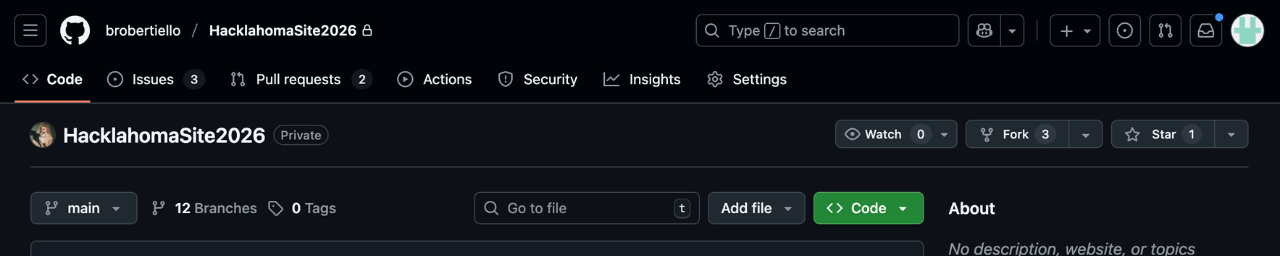
Tasks are usually tracked in:
- GitHub Issues - Check the project's Issues tab
- Project Board - Kanban-style board with tasks
- Team Meetings - Tasks assigned directly by leads
Look for tasks labeled:
good first issue- Perfect for beginnersbeginner-friendly- Doesn't require advanced knowledgehelp wanted- Team needs someone to tackle this
3. Create Your Branch
Use our branching naming convention:
# For new features
git checkout -b feature/descriptive-name

# For bug fixes
git checkout -b bugfix/descriptive-name

# For hot fixes (urgent production issues)
git checkout -b hotfix/descriptive-name
Examples:
git checkout -b feature/add-user-profile
git checkout -b feature/dark-mode-toggle
git checkout -b bugfix/fix-login-redirect
git checkout -b bugfix/navbar-responsive-issue
4. Develop Your Feature
Start the Development Server
npm run dev
# or
npm start
Make Your Changes
- Write clean, readable code
- Follow the project's coding style
- Add comments for complex logic
- Keep components small and focused
Test As You Go
- Test your changes in the browser
- Check different screen sizes (responsive design)
- Try edge cases (empty inputs, long text, etc.)
- Make sure existing features still work
5. Write Good Commits
Commit frequently with clear messages:
# Check what you've changed
git status
git diff

# Stage your changes
git add src/components/UserProfile.tsx
git add src/styles/profile.css

# Or stage all changes
git add .

# Commit with a descriptive message
git commit -m "feat: add user profile component with avatar and bio"
Commit Message Guidelines
Format: <type>: <description>
Types:
feat:- New featurefix:- Bug fixdocs:- Documentation changesstyle:- Code formatting (not CSS)refactor:- Code restructuringtest:- Adding testschore:- Maintenance tasks
Good Examples:
git commit -m "feat: add dark mode toggle to navbar"
git commit -m "fix: resolve login redirect issue on Safari"
git commit -m "refactor: extract form validation into custom hook"
git commit -m "docs: update README with installation steps"
Bad Examples:
git commit -m "changes"
git commit -m "fix stuff"
git commit -m "asdf"
git commit -m "this should work now hopefully"
6. Push Your Branch
# First time pushing this branch
git push -u origin feature/your-feature-name

# Subsequent pushes
git push
7. Create a Pull Request (PR)
On GitHub:
- Go to the repository page
- Click "Pull Requests" tab
- Click "New Pull Request"
- Select your branch
- Fill out the PR template
PR Title
Use the same format as commit messages:
feat: Add user profile component
fix: Resolve navbar responsive issues
PR Description Template
## What does this PR do?
Brief description of the changes

## Type of Change
- [ ] New feature
- [ ] Bug fix
- [ ] Breaking change
- [ ] Documentation update

## How to Test
1. Step by step testing instructions
2. What to look for
3. Edge cases to check

## Screenshots (if applicable)
[Add screenshots showing the changes]

## Checklist
- [ ] My code follows the project's style guidelines
- [ ] I have tested my changes locally
- [ ] I have commented complex code
- [ ] My changes don't break existing functionality
- [ ] I have updated relevant documentation
Example PR Description
## What does this PR do?
Adds a user profile page that displays user information including avatar, name, bio, and join date.

## Type of Change
- [x] New feature

## How to Test
1. Navigate to `/profile` route
2. Verify user information displays correctly
3. Try clicking the "Edit Profile" button
4. Check responsive layout on mobile

## Screenshots
[Screenshot of profile page]

## Checklist
- [x] My code follows the project's style guidelines
- [x] I have tested my changes locally
- [x] I have commented complex code
- [x] My changes don't break existing functionality
8. Code Review Process
After creating your PR:
- Automated Checks run (linting, tests, builds)
- Team members review your code
- Feedback is provided via comments
- You address feedback and push updates
- Approval when everything looks good
Responding to Feedback
When reviewers leave comments:
# Make requested changes
# ... edit files ...

# Stage and commit
git add .
git commit -m "refactor: address PR feedback - extract validation logic"

# Push updates
git push
Tips:
- Don't take feedback personally - it makes everyone better
- Ask questions if you don't understand
- Thank reviewers for their time
- Learn from the suggestions
9. Keep Your Branch Updated
If main gets updated while you're working:
# Save your current work
git add .
git commit -m "work in progress"

# Get latest main
git checkout main
git pull

# Go back to your branch
git checkout feature/your-feature

# Merge main into your branch
git merge main

# Or rebase (cleaner history, but more advanced)
git rebase main

# If there are conflicts, resolve them
# Then push (may need --force if you rebased)
git push
10. After Your PR is Merged
# Switch back to main
git checkout main

# Pull the latest changes (includes your work!)
git pull

# Delete your local branch (optional but clean)
git branch -d feature/your-feature

# Delete remote branch (optional)
git push origin --delete feature/your-feature
Development Best Practices
Before Starting
- Make sure you understand the task
- Ask questions if anything is unclear
- Check if similar code exists you can reference
- Set up your environment properly
While Developing
- Write small, focused commits
- Test frequently in the browser
- Keep your branch up to date with main
- Follow the project's code style
- Don't commit sensitive data (API keys, passwords)
- Comment complex logic
Before Creating PR
- Test everything thoroughly
- Run the linter:
npm run lint - Run tests (if the project has them):
npm test - Build the project:
npm run build - Review your own changes
- Write a clear PR description
During Code Review
- Respond to all comments
- Ask for clarification if needed
- Make requested changes promptly
- Be open to learning
Common Scenarios
Scenario 1: Fixing a Bug
# 1. Reproduce the bug locally
# 2. Create bugfix branch
git checkout main
git pull
git checkout -b bugfix/fix-button-crash

# 3. Fix the bug and test
# ... make changes ...

# 4. Commit and push
git add .
git commit -m "fix: prevent crash when button clicked without data"
git push -u origin bugfix/fix-button-crash

# 5. Create PR with:
#    - Description of the bug
#    - What caused it
#    - How you fixed it
#    - How to test the fix
Scenario 2: Adding a New Feature
# 1. Create feature branch
git checkout main
git pull
git checkout -b feature/add-search-bar

# 2. Break down the feature into steps
# - Create search component
# - Add search functionality
# - Style the component
# - Add to navbar

# 3. Commit after each logical step
git add src/components/SearchBar.tsx
git commit -m "feat: create search bar component skeleton"

git add src/components/SearchBar.tsx
git commit -m "feat: implement search functionality"

git add src/styles/SearchBar.css
git commit -m "style: add styling to search bar"

git add src/components/Navbar.tsx
git commit -m "feat: integrate search bar into navbar"

# 4. Push and create PR
git push -u origin feature/add-search-bar
Scenario 3: Merge Conflicts
# Your branch is behind main and has conflicts

# 1. Update main
git checkout main
git pull

# 2. Try to merge
git checkout feature/your-feature
git merge main

# 3. Git shows conflicts in files
# CONFLICT (content): Merge conflict in src/App.tsx

# 4. Open the file and look for:
# <<<<<<< HEAD
# Your changes
# =======
# Changes from main
# >>>>>>> main

# 5. Edit the file to resolve conflicts
# Remove the markers and keep the correct code

# 6. Mark as resolved
git add src/App.tsx
git commit -m "merge: resolve conflicts with main"
git push
Communication Tips
- Ask questions in team chat or meetings
- Share progress - Update the team on what you're working on
- Request help when stuck for more than 30 minutes
- Report blockers - Tell the team if something is preventing your progress
- Participate in code reviews - Review others' PRs to learn
Resources
Team Resources
- Team Chat (Slack/Discord)
- Project Documentation
- Code Style Guide
- Team Wiki or Knowledge Base
Getting Unstuck
- Read the error message carefully
- Google the error - Someone has likely had the same issue
- Check the documentation
- Look at similar code in the project
- Ask the team - Don't struggle alone!
Next Steps
Congratulations! You've completed the onboarding guide. You now have the foundation to:
- Understand HTML, CSS, and TypeScript
- Use Git for version control
- Build components with React
- Follow our development workflow
What to do next:
- Pick your first issue - Look for "good first issue" labels
- Set up the project locally
- Join team meetings to meet everyone
- Start contributing - Make your first PR!
- Keep learning - Explore the resources linked throughout this guide
Remember:
- Everyone was a beginner once
- It's okay to ask questions
- Mistakes are learning opportunities
- The team is here to help you succeed
Welcome to the team! We're excited to see what you'll build! 🚀